The Kenya Health Information System is a free and open source health data management platform used by the ministry of health to manage the collection, reporting and utilization of health information to monitor and improve patient health, disease surveillance and disease outbreaks while allowing for fast and easy sharing and access of health data by all stake holders.
The Kenya Health Information System (KHIS/DHIS2) is a fully web-based platform that supports an array of data visualization features which allows the analysis of live data in real time.
Students and a myriad of other health professionals might at some point in their education & careers require access to health information in the KHIS website either for research or any other reason.
In order for any health professional interested in accessing the health data contained in the KHIS Aggregate site, he/she requires a Kenya Health Information System account. This blog post is going to show the steps you need to take in order for you to apply for a KHIS Aggregate account.
The KHIS account application process is fairly easy and is comprised of just 3 simple steps highlighted below.
Step 1: Navigate to the MOH Service Desk Portal
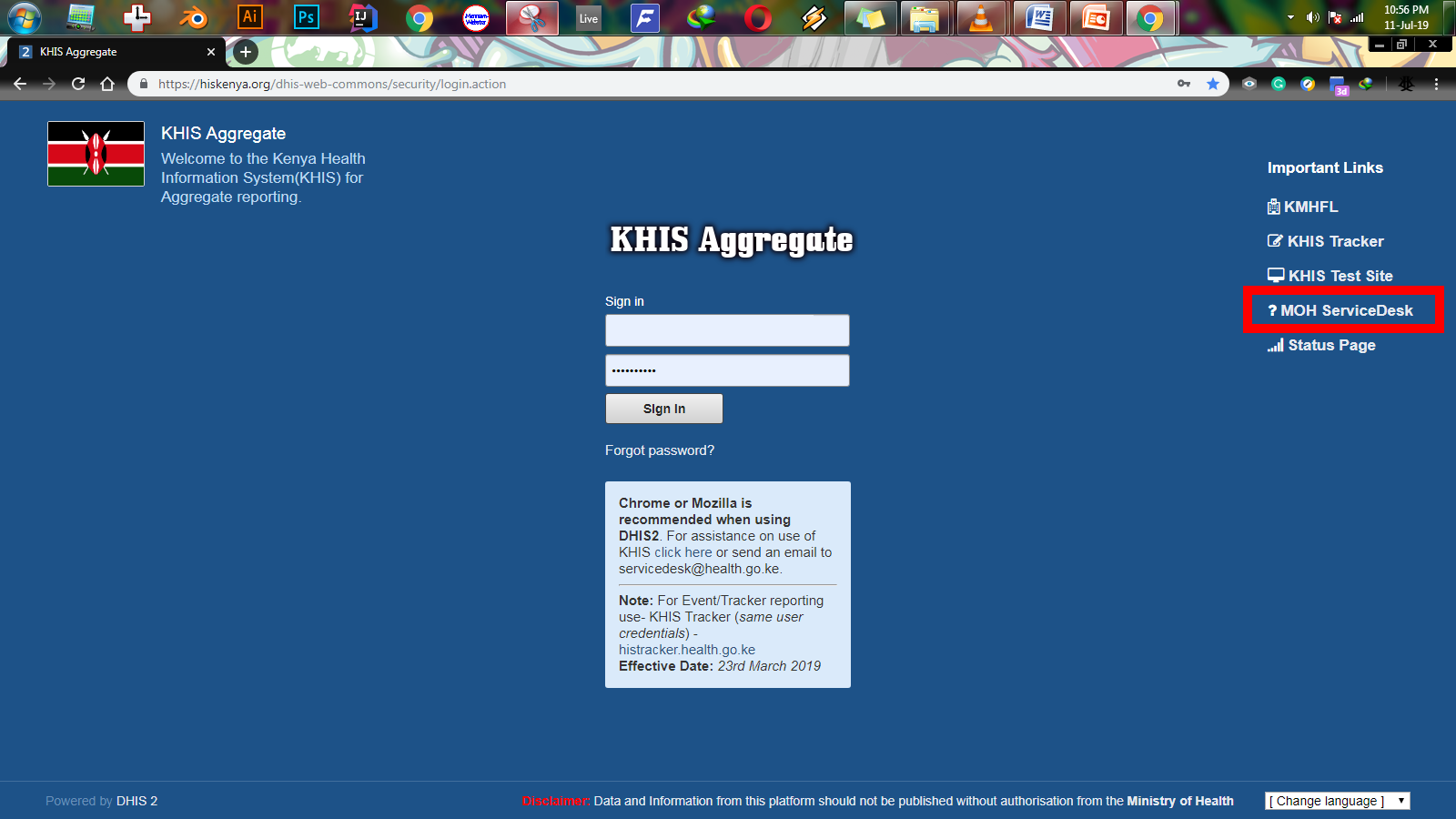
Unlike other websites, the Kenya Health Information System (KHIS/DHIS2) does not allow users to create their own accounts. Instead, accounts are created for users through an official request made via the Ministry of Health Service Desk.
So for you to get a KHIS/DHIS2 account, just proceed to the KHIS Aggregate website and click on the MOH Service Desk link (highlighted in red in the image above). This will direct you to the Ministry of Health Service Desk portal whereby you will be able to submit a ticket requesting for your KHIS/DHIS2 account.
Step 2: Download and fill the KHIS/DHIS2 account request form
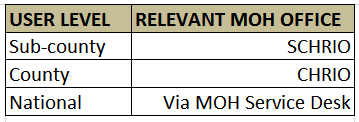
Once you are at the MOH service desk portal, you will see a link for downloading the Kenya Health Information System Account Request Form. You are then required to submit the form duly completed to the relevant ministry of health office for the level you work in.
Below is a table showing level of users and where they need to submit their forms.
Step 3: Submit your completed form to the relevant MOH offices.
Once you have downloaded and fully completed the KHIS/DHIS2 account request form, you are required to drop it at the relevant Ministry of Health offices (refer to the table above). Your account will then be created for you and you can now access health information from the Kenya Health Information System site.
 Health Systems Info
[…] applying for a KHIS/DHIS2 account. If you do not have an account, please click here to find out how to apply for a Kenya Health Information System account. Click the link below to go to the KHIS Aggregate log in […]
LikeLike